Simple Smooth Telehealth Visits

One click for Patients

Get a VSee Free clinic — unlimited, secure, HIPAA-compliant video, voice, and chat.

Not All Platforms Are Created Equal

VSee

Doximity

Doxy

Zoom

Unlimited Calls
Waiting Room
Phone dial-out
ePayment
Scheduling
Appointment reminder
Intake form
Custom consent
EMR notes
eRX add on

Simple Secure Video, Unlimited Minutes

All plans include:

  • Unlimited secure 1-1 video calls and messaging
  • Easy patient connect — no download, no account creation
  • Personalized waiting room
  • Phone dial-in / dial-out backup
  • Signed BAA for HIPAA compliance
Telehealth secure video

Reduce Admin Burdens with PLUS Plan

Automate check-in, payments, SMS reminders

VSee PLUS Plan features:

  • Client self-intake and telehealth consent
  • Client portal with visit notes and file uploads
  • Auto-sent SMS & email reminders
  • Upfront credit card payments
  • Client self-scheduling (group and individual sessions)

How a VSee Clinic Works

Get a detailed walk-through of a Basic VSee Clinic

  • [0:21] Navigate the Provider Dashboard
  • [0:42] Manage patient queue, start video call in one click
  • [1:26] Guest invite link to bring in family and interpreters
  • [2:09] Invite patients to a video visit, 2:32 set up your calendar
  • [2:52] How to set up your VSee Clinic profile, notifications,
    [3:35] credit card payments, etc.
  • [4:30] User-friendly patient experience for VSee Clinic
  • [6:16] How to upgrade from your VSee Free plan

Always Encrypted, HIPAA-Compliant

Your client data is always secure with VSee — whether transmitted or stored, your video visits are encrypted with 256-bit AES or DTLS 1.2+ encryption to ensure compliance and privacy. VSee is also SOC II certified by third-party auditors.

Your Free, Plus, or Premium plan also includes a Business Associate Agreement (BAA) required for HIPAA compliance. More in our FAQ section

Start Free, Add Features as Needed

FREE

Basic walk-in waiting room for solo providers

$0

/per month per provider

Get Free Now

Free features

  • No download, one-click video link
  • Unlimited 1-1 HD video, chat, screenshare
  • Personalized waiting room
  • Short intake (name & optional reason)
  • Signed BAA for HIPAA compliance
  • Knowledge base and email support
PLUS

Versatile solo waiting room for walk-ins, groups, and appointments.

$29

/per month per provider

Trial Free 14 Days

Free features +

  • Custom subdomain
  • Patient portal
  • Unlimited group video*
  • Standard intake and consent
  • Credit card payment
  • SMS/email invites and reminders
  • Phone dial-out
  • Add or invite family, interpreters, and guests
  • *on-demand and scheduled
PREMIUM

Complete shared waiting room + front desk for remote care teams up to 50

$49*

/per month per provider

Get Premium

Plus features +

  • Custom logo & branding
  • Shared waiting room
  • Shared Scheduling
  • Custom intake**
  • Standard EMR notes
  • Standard reports and usage analytics
  • User management
  • Notifications management
  • Patient and workflow tagging
  • Live chat and phone support
  • * $200 one-time setup fee
  • ** Update default fields and add up to 10 custom intake fields
  • ***Add-on: e-Prescription EPCS (contact us)

VSee Subscription FAQs

Does VSee include scheduling and payment collection features?

Yes! Scheduling and payment functionality are available on VSee Plus and higher subscriptions.
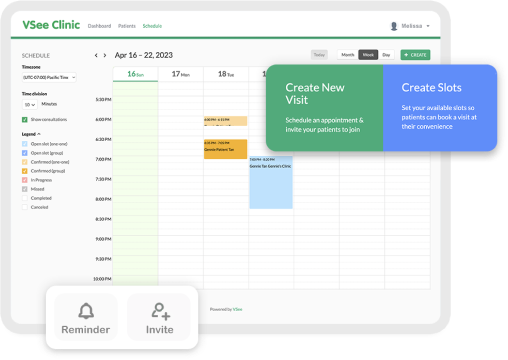
Scheduling allows you to book appointments for the patient, it also lets you set your calendar availability so patients can self-schedule appointments.

Payment allows you to collect credit card payments and to keep card information on file, along with the ability to set Visit Types with different charge amounts and time duration.

How do I add more providers to my Clinic?

To add providers and schedulers to your Clinic, you will need to be on a Premium or Enterprise subscription plan. These plans allow you to add multiple providers, assign different roles (provider, scheduler, etc.), and share waiting room queues and booking calendars.

Can I perform a group call on VSee?

Yes. Except for the Free plan, all VSee plans allow for group sessions for both scheduled and on-demand sessions. One-time guest add-in links (that bypass intake) are also available and can be sent with scheduled appointments or during a video visit. VSee recommends no more than 30 participants in a session. Video quality is also highly dependent on the quality of the participants' networks and devices.

Which app does a provider use and which app does a patient use?

This depends on which service the provider is using. If the provider is using VSee Messenger without a connected Clinic for video visits then the patient should use VSee Messenger. If the provider is using VSee Clinic, then the patient can use their browser or the VSee Clinic mobile app. VSee Clinic providers who wish to receive room alerts on their device will need to get VSee Messenger on their mobile device.

Does VSee integrate with my EMR?

Enterprise VSee integrates with Epic, Cerner, NextGen, Credible, and other EMRs. To get telehealth visits up fast, we recommend starting off with using VSee Clinic side by side with your EMR until you get a better feel for your workflow needs. Please contact us for info about integration with your EMR.

How do I connect with the patient from my waiting room dashboard?

Please see our Helpdesk article “How to call the patient”

How do patients on mobile connect to my waiting room?

Simply send your patients to your VSee Clinic web link. When they click “Enter Waiting Room” they will be able to connect with you with NO downloading. Alternatively, patients can choose to open the VSee Clinic for Patients mobile app from your weblink. When they go through the app, it will automatically be populated with your unique room code. This room code may also be found on your VSee Clinic weblink page.

How does HIPAA-compliance work?

There are 2 parts to consider when providers are looking to be HIPAA-compliant

  • Does your vendor sign a HIPAA Business Associate Agreement (BAA) with you?
    Yes, VSee signs a HIPAA BAA for all VSee plans except Free VSee Messenger. Learn more about HIPAA at vsee.com/hipaa
    * The BAA is a required legal agreement between you and your vendor that makes your vendor liable for any breaches of privacy & security according to HIPAA rules
  • Does your vendor follow HIPAA recommendations for security and privacy?
    Yes, VSee uses 256-bit AES encryption and to keep patient data secure both at rest and in transmission and regularly conducts HIPAA security audits and training.

What is VSee Messenger?

VSee Messenger is the downloadable secure group video + screenshare app that comes with your VSee Plan and is already linked to your clinic. VSee Messenger allows you to receive waiting room alerts on your mobile device. You may also use it to conduct video calls with clients that enter your clinic waiting room instead of a web browser.

Ready to get started?

Trial Plus Free 14 days

Get Detailed Feature Comparisons or contact us for enterprise customizations.